


 |
 |
 |
 |
 |
 |
 |

|
|||
 |
|||

Character list
The General wants us to move with the digital age. He is fed up with the paperwork and he seems to think that by creating a list of characters on a computer he will be able to search and sort more efficiently and change data easily.
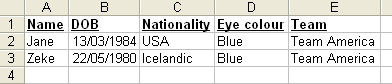
You need to use Access database (or Microsoft Excel if you are told to by Mr H - this means you too Giovanna) for this heroic mission. The General wants the following headings (fields) on your list :
- Name
- DOB
- Nationality
- Eye colour
- Team (Team America or Renegade Hero)
Use Profiles pages as your information source and make sure it looks top notch - the General always says "First impressions count - and count again."
Once you have entered all of the characters into your list the General needs the following information :
- A search for the characters with blue eyes
- A search for characters in Team America
- A search for characters with the Renegade Heroes
- A search for characters with a DOB before 1995
- A search for characters with blue eyes and are members of Team America
- A list sorted by DOB (oldest at top)
- A list sorted by Name in alphabetic order

Use Autofilter and Sort to achieve the above tasks
The General's final request is that you use the File>Save as webpage feature> to create a webpage to be shared online.
Find out more
- Try to do one of the above sorts by hand - are you quicker than the computer ?
- Take a look at advanced filter in excel - why is this useful ?
- Input masks are often used when people are entering the date - what is an input mask ?
 |
